> ## Documentation Index
> Fetch the complete documentation index at: https://moengage-docs-limits-personalize.mintlify.site/llms.txt
> Use this file to discover all available pages before exploring further.
# ver 0.1 (0.11)
Package Link: Click [here](https://login.salesforce.com/packaging/installPackage.apexp?p0=04tOS00000IFrRZYA1).
This release improves system stability, reduces sync errors, and cleans up outdated fields. These enhancements, combined with UI fixes, smarter error handling, and layout updates, deliver a smoother experience for admins and users alike.
# New Changes & Enhancements
## (Field Deprecation) Sync Object
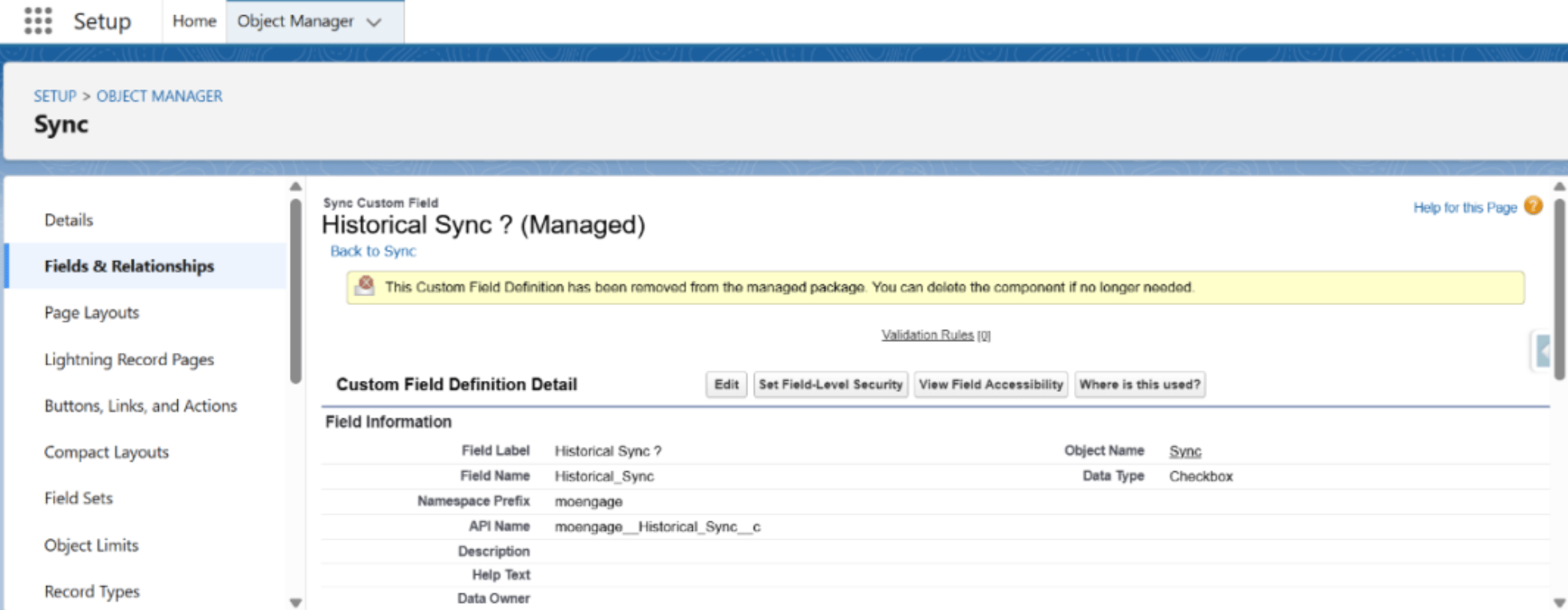
* The `Historical Sync?` checkbox field is now deprecated.
* For **New Installs** , this field will not appear.
* For upgraded Orgs, this field may still be visible, but is safe to delete. Notification appears in Object\
Manager:
 ## New Field Added
* Name: `Last Historic Sync Apex Batch Job Id`
* Type: Formula Field
* Value: 15-character Apex Batch Job ID for Last Historical Sync.
Use this field value to monitor the progress of your Historic Syncs in Real-Time. Read more [here](/partner-guide/data-and-analytics/crm/salesforce-crm-native/sync-salesforce-objects-to-moengage).
## Field Relabels
* `Last Historic Sync Batch Job Id` is now called `Last Historic Sync Batch Raw Job Id`.
* `Link to Last Historic Sync Queue Record` is now called `Last Historic Sync Queue Record`.
## Sync Object: Page Layout Update
Page layout changes do not auto-apply for package upgrades. Customers must manually update the “Sync Layout” to reflect these updates.
### Removed the following fields from UI:
1. `Last Historic Sync Batch Raw Job Id`
2. `Last Historic Sync Queue ID`
### Added the following fields on the UI:
1. `Last Historic Sync Apex Batch Job Id`
2. `Last Historic Sync Queue Record`
# Issue Fixes
## DML Exception During Historical Sync
### Problem
Syncing MoEngage Events failed when records had a blank customer\_id. The system\
threw a DML error:\
`INVALID_OR_NULL_FOR_RESTRICTED_PICKLIST, Error Type: bad value for restricted picklist field: customer_id can not be empty`
### Fix
Now, instead of a DML exception, Failed Sync Queue records will be created for such entries, improving sync reliability.
## (UI Fix) "Sync Partial Success" Button
* The button was breaking into two lines on the macOS UI.
* **Resolved:** Now displayed properly on a single line.
## Manual Retry: Unhandled Exceptions
* A Salesforce platform issue caused errors during manual retry.
* **Resolved:** Manual retry is now fully functional.
## New Field Added
* Name: `Last Historic Sync Apex Batch Job Id`
* Type: Formula Field
* Value: 15-character Apex Batch Job ID for Last Historical Sync.
Use this field value to monitor the progress of your Historic Syncs in Real-Time. Read more [here](/partner-guide/data-and-analytics/crm/salesforce-crm-native/sync-salesforce-objects-to-moengage).
## Field Relabels
* `Last Historic Sync Batch Job Id` is now called `Last Historic Sync Batch Raw Job Id`.
* `Link to Last Historic Sync Queue Record` is now called `Last Historic Sync Queue Record`.
## Sync Object: Page Layout Update
Page layout changes do not auto-apply for package upgrades. Customers must manually update the “Sync Layout” to reflect these updates.
### Removed the following fields from UI:
1. `Last Historic Sync Batch Raw Job Id`
2. `Last Historic Sync Queue ID`
### Added the following fields on the UI:
1. `Last Historic Sync Apex Batch Job Id`
2. `Last Historic Sync Queue Record`
# Issue Fixes
## DML Exception During Historical Sync
### Problem
Syncing MoEngage Events failed when records had a blank customer\_id. The system\
threw a DML error:\
`INVALID_OR_NULL_FOR_RESTRICTED_PICKLIST, Error Type: bad value for restricted picklist field: customer_id can not be empty`
### Fix
Now, instead of a DML exception, Failed Sync Queue records will be created for such entries, improving sync reliability.
## (UI Fix) "Sync Partial Success" Button
* The button was breaking into two lines on the macOS UI.
* **Resolved:** Now displayed properly on a single line.
## Manual Retry: Unhandled Exceptions
* A Salesforce platform issue caused errors during manual retry.
* **Resolved:** Manual retry is now fully functional.