> ## Documentation Index
> Fetch the complete documentation index at: https://moengage-docs-limits-personalize.mintlify.site/llms.txt
> Use this file to discover all available pages before exploring further.
# Push Notification Grouping
> Group related push notifications together using a group key to reduce notification drawer clutter on both Android and iOS user devices.
# Overview
The *Notification Grouping* feature enables marketers to categorize push notifications by defining a group key, ensuring related messages appear together in the notification drawer. Notification grouping is supported in Android and iOS push notifications. Grouping related notifications reduces clutter, improves user experience, and increases engagement with marketing content.
# Use Cases
The following are some use cases for this feature:
* **News apps**: Stack updates by category, such as sports, politics, and entertainment.
* **Banking apps**: Group transaction-related notifications for better tracking.
* **E-commerce apps**: Organize order updates, promotions, and recommendations.
# How Notifications Grouping Works
* Ensure you have the MoEngage Android SDK version 14.00.00 and later with the `ismultiplenotificationsindrawer` config set to *true* to access the notification grouping feature on Android devices.
* Ensure you have MoEngage iOS SDK version 9.24.0 and later to access the notification grouping feature.
Perform the following steps to group your push notifications:
1. In the second step of [push campaign creation](/user-guide/campaigns-and-channels/mobile-push/create/create-push-campaigns), **Content**, expand the **Advanced** tab.
2. In the **Group key** box, enter the group ID.
* This group ID identifies and categorizes related push notifications. Ensure you use the same group key for all push notifications you want to group.
* MoEngage automatically modifies the group key to ensure it does not exceed the 45-character limit. MoEngage removes non-Latin scripts, special characters, and spaces to restrict the key composition to ASCII characters exclusively.
3. Complete the remaining steps of the push campaign creation process and send your campaign.
## Example
We will create a Push campaign for a new app called *MoEngage Today*. This app wants to send push notifications for the latest news in three categories: Sports, Politics, and Entertainment. It wants these notifications to stack within the user's notification drawer based on their respective categories.
Let's assume the *MoEngage Today* app team is creating three separate Push campaigns, one for each category.
* **Sports news campaign**:
* **Content creation**: Draft the notification messages, for example:
* *Breaking! FC Barcelona wins the El Clasico in dramatic fashion!*
* *Lakers defeat Warriors in Western Conference showdown*.
* **Group Key**: In the **Group key** box, enter *newssports.*
* **Politics news campaign**:
* **Content creation**: Draft the notification messages, for example:
* *The government unveils new policy changes impacting citizens nationwide.*
* *Developments in recent political events*.
* **Group Key**: In the **Group key** box, enter *newspolitics.*
* **Entertainment news campaign**:
* **Content creation**: Draft the notification messages, for example:
* *Billie Eilish drops a surprise album overnight.*
* *Avengers: Endgame becomes the highest-grossing movie of all time!*
* **Group Key**: In the **Group key** box, enter *newsentertainment*.
### Outcomes
When these push notifications are delivered on a user's device:
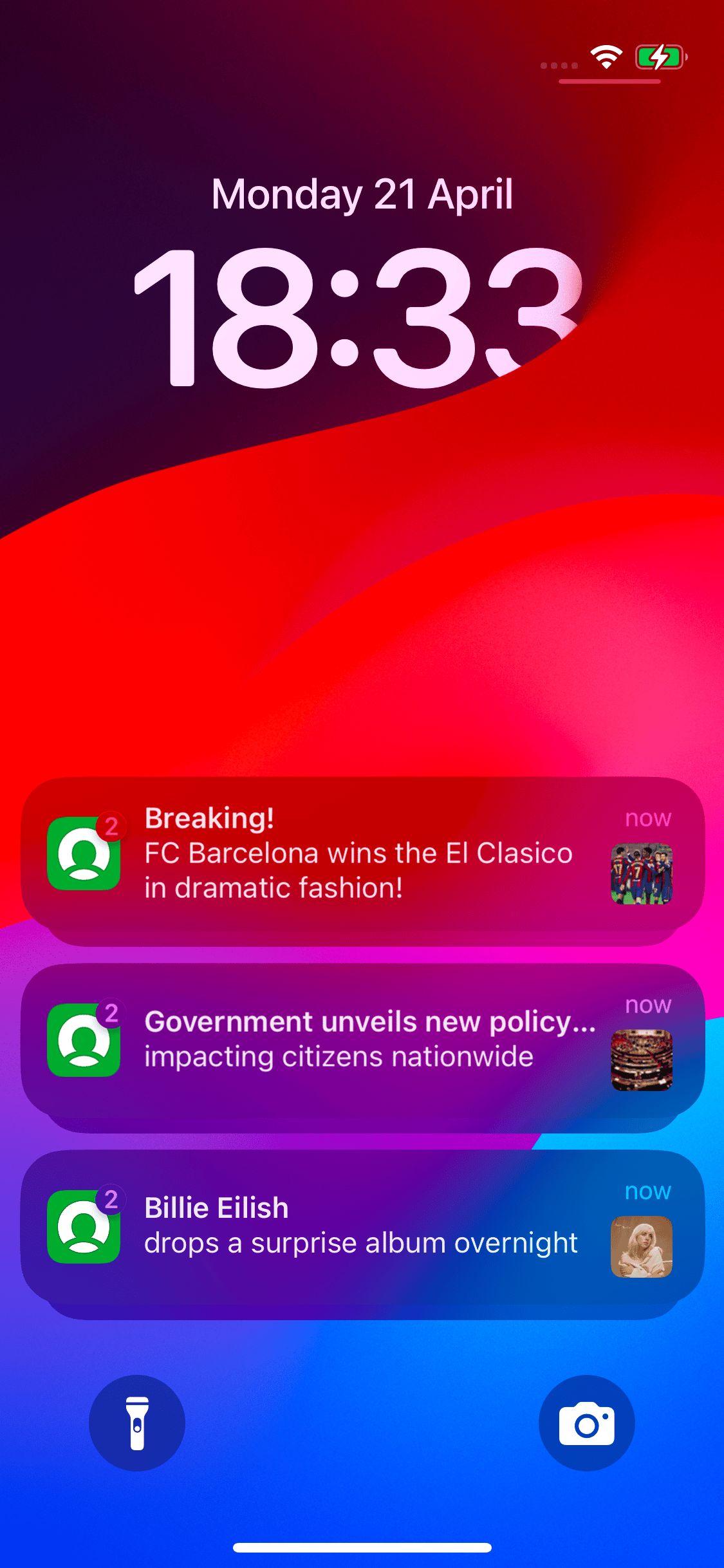
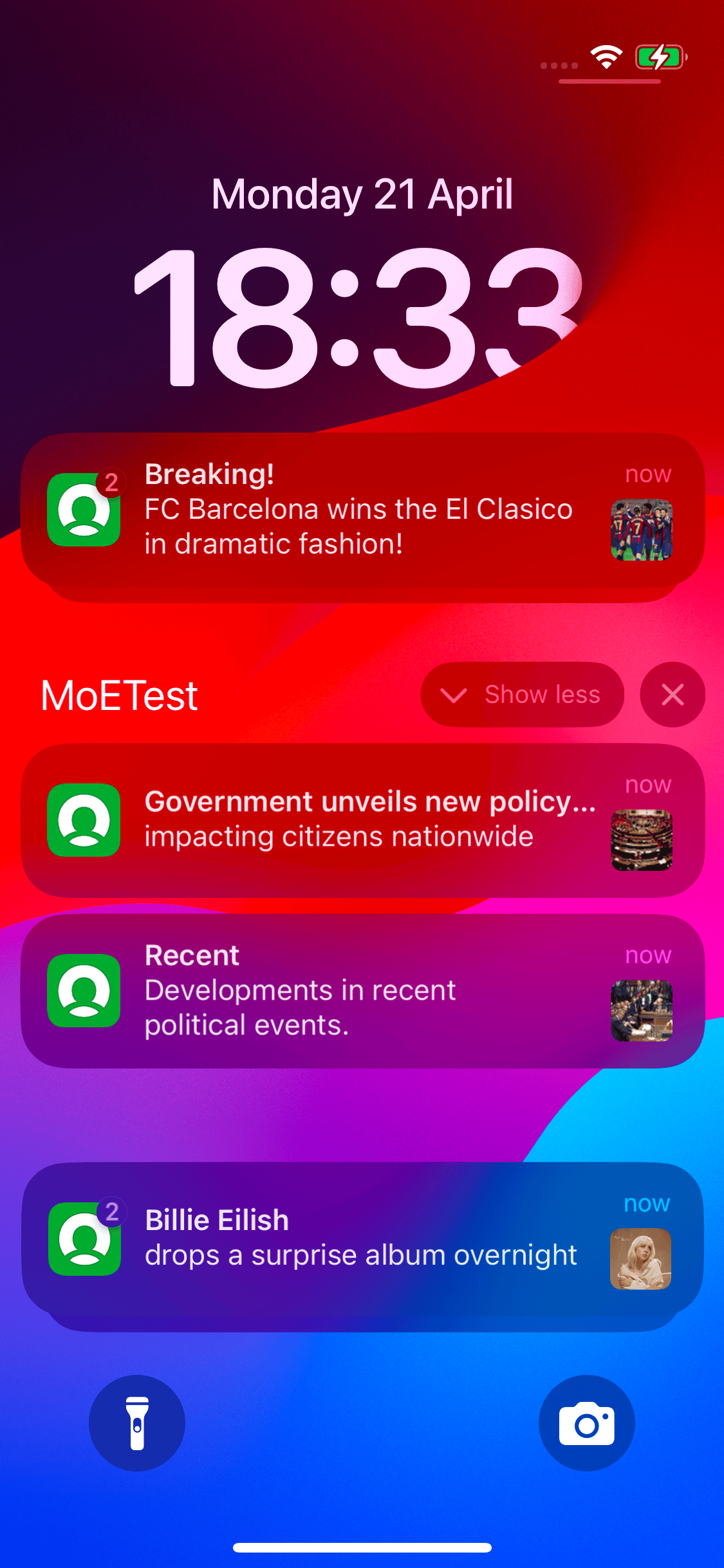
* All sports news notifications with the *newssports* group key will be stacked under a single expandable group, showing a summary like *2 new messages*.
* Similarly, all political news notifications with the *newspolitics* group key will be stacked under another group.
* All entertainment news notifications with the *newsentertainment* group key will be stacked under another group.
| Android | iOS |
| ------------------------------------------------------------------------------------------------------------------------------------------------------------------------------------------------------------------------------------------------------------------------------------------------------------------------------------------------------------------------------------------------------------------------------------------------------------------------------------------------------------------------------------------------------------------------------------------------------------------------------------------------------------------------------------------------------------------------------------------------------------------------------------------------------------------------------------------------------------------------------------------------------------------------------------------------------------------------------------------------------------------------------------------------------------------------------------------------------------------------------------------------------------------------------------------------------------------------------------------------------------------------------------------------------------------------------------------------------------------------------------------------------------------------------------------------------------------------------------------------------------------------------------------------------------------------------------- | ------------------------------------------------------------------------------------------------------------------------------------------------------------------------------------------------------------------------------------------------------------------------------------------------------------------------------------------------------------------------------------------------------------------------------------------------------------------------------------------------------------------------------------------------------------------------------------------------------------------------------------------------------------------------------------------------------------------------------------------------------------------------------------------------------------------------------------------------------------------------------------------------------------------------------------------------------------------------------------------------------------------------------------------------------------------------------------------------------------------------------------------------------------------------------------------------------------------------------------------------------------------------------------------------------------------------------------------------------------------------------------------------------------------------------------------------------------------------------------------------------------------------------------------------------------------------------------- |
| **Collapsed view** 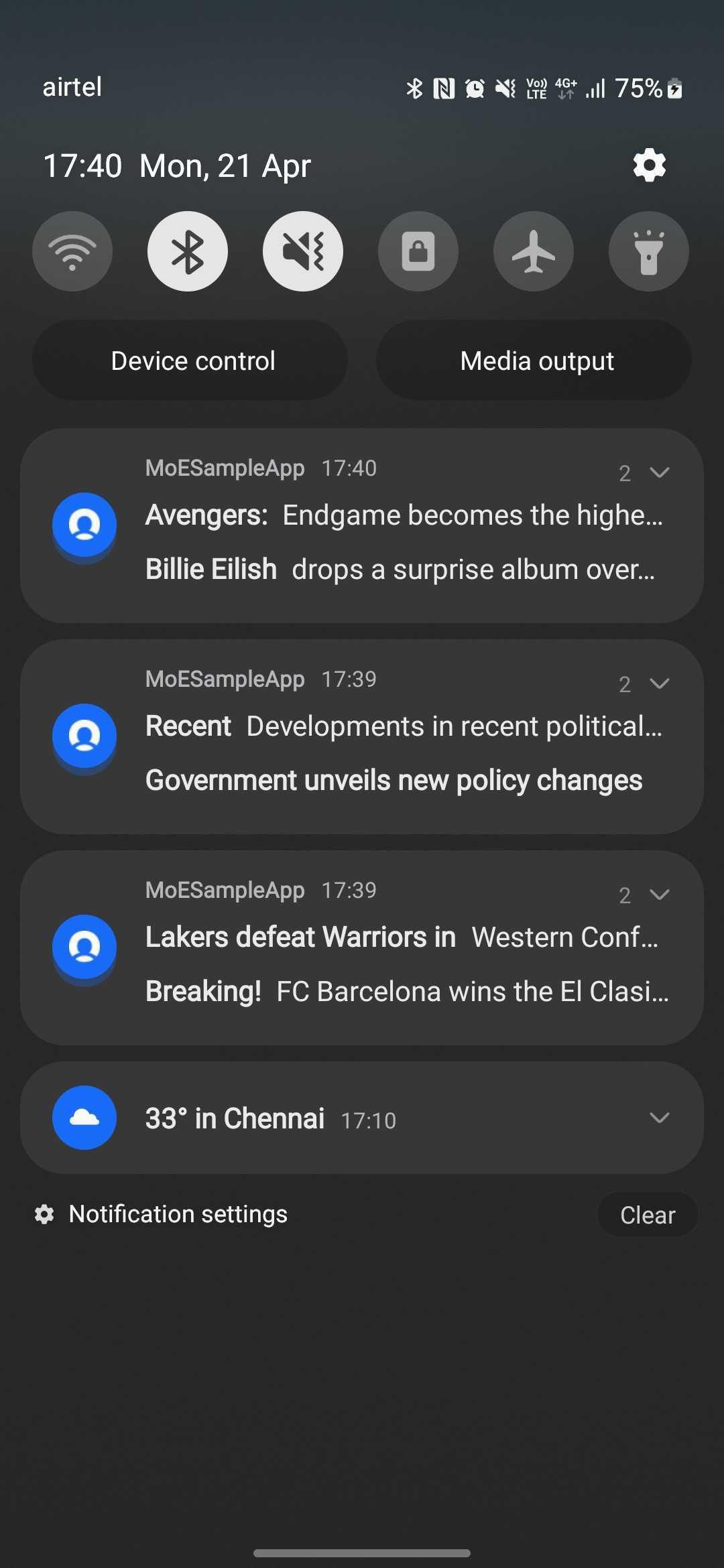 | **Collapsed view** **
 ** |
| **Expanded view**
** |
| **Expanded view** 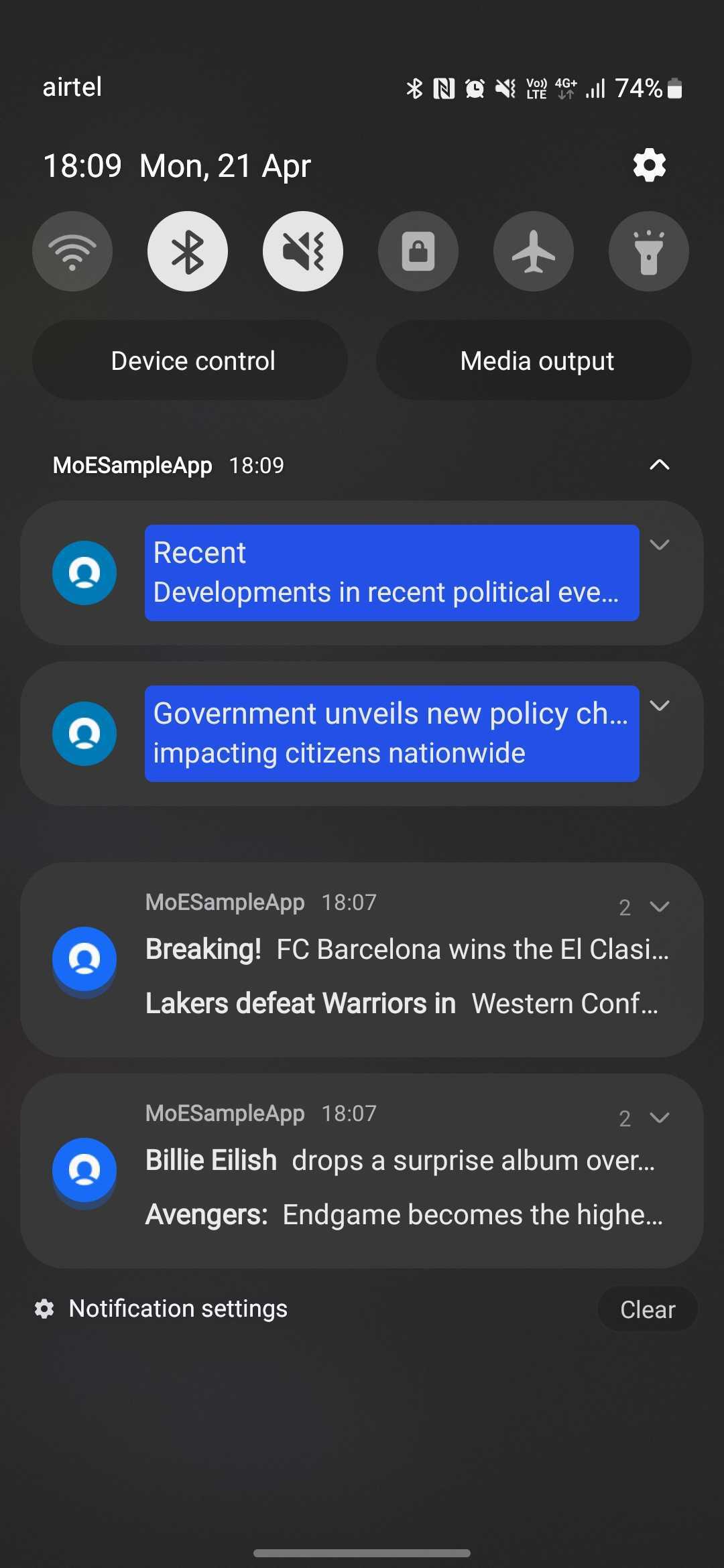 | **Expanded view**
  |
# On Device Behavior
## In Android
* Android allows grouping multiple notifications starting from Android 7.0 (API level 24) to keep the notification drawer organized. For more info, see the [Android Notification Guide](https://developer.android.com/develop/ui/views/notifications/group).
* Notifications with the same group key are stacked in the notification drawer. The notification drawer shows a summary notification combining the latest two messages:
* Line 1: Title 1 – Message 1
* Line 2: Title 2 – Message 2
* The summary of the notification group in the collapsed state will be the same as that of the latest notification.
* Clicking the group opens the latest notification. Expanding the group displays individual notifications.
* When a user clicks a grouped notification, the click is attributed to the most recent notification.
* For the *Notification Received* event, the value of the group key appears as an event attribute named **Group Key**.
### Limitations
* For push templates, the backup notification appears in the collapsed group view, not the full template content.
* It may take some time to group notifications. The first notification in a group may initially appear as a separate notification and is merged into the group after a delay. This behavior is most commonly observed when the notification drawer is open. The SDK does not have control over this grouping delay.
## In iOS
* Apple started supporting notification grouping in iOS 12, allowing related notifications to be stacked together for a streamlined experience. For more info, see [Apple Developer Documentation](https://developer.apple.com/documentation/watchos-apps/grouping-notifications).
* APNS thread ID manages the stacking of notifications with the same group key in the notification drawer.
* The grouping behavior is subject to device settings:
* If the user changes the notification grouping from *Automatic*, the feature does not work. For more information, refer [here](https://developer.apple.com/documentation/devicemanagement/notifications/notificationsettingsitem). The type of grouping for notifications:
* *0*: *Automatic*: Groups notifications into app-specified groups.
* *1*: *By app*: Groups notifications into one group.
* *2*: *Off*: Does not group notifications.
* For the *Notification Received* event, the value of the group key appears as an event attribute named **Group Key**.
### Limitations
* Notifications are not grouped in the Push Notification Center or Self-handled Notification Center.
* Only devices running SDK versions supporting notification grouping will display grouped notifications. Older SDKs will ignore the feature.
# FAQs
You can track the group key using *Notification Received* events, filtering by platform, group key, and campaign ID.
Yes, because notifications are stacked, users may interact with fewer notifications, potentially leading to lower engagement rates.
This happens because the `ismultiplenotificationsindrawer` config is set to false. In this case, the latest notification replaces the previous one, ensuring that only one notification remains visible, regardless of the group key and update key configurations.
The notification grouping feature does not work in the following scenarios:
* If iOS users disable *Automatic* grouping in their device settings.
* If you use an older SDK version that does not support notification grouping.
* If the `ismultiplenotificationsindrawer` config is set to false for Android devices.
No, MoEngage doesn't support the customization of group messages.
You can split the notification received events by platform and group key by performing the following steps:
1. On the left navigation menu in the MoEngage dashboard, click **Analyze**, and then click **Behavior**.
2. In the **Events and filters** section, select the *Notification Received Android*OR *Notification Received iOS* attributes and Split by *Group Key*as shown in the image below.
|
# On Device Behavior
## In Android
* Android allows grouping multiple notifications starting from Android 7.0 (API level 24) to keep the notification drawer organized. For more info, see the [Android Notification Guide](https://developer.android.com/develop/ui/views/notifications/group).
* Notifications with the same group key are stacked in the notification drawer. The notification drawer shows a summary notification combining the latest two messages:
* Line 1: Title 1 – Message 1
* Line 2: Title 2 – Message 2
* The summary of the notification group in the collapsed state will be the same as that of the latest notification.
* Clicking the group opens the latest notification. Expanding the group displays individual notifications.
* When a user clicks a grouped notification, the click is attributed to the most recent notification.
* For the *Notification Received* event, the value of the group key appears as an event attribute named **Group Key**.
### Limitations
* For push templates, the backup notification appears in the collapsed group view, not the full template content.
* It may take some time to group notifications. The first notification in a group may initially appear as a separate notification and is merged into the group after a delay. This behavior is most commonly observed when the notification drawer is open. The SDK does not have control over this grouping delay.
## In iOS
* Apple started supporting notification grouping in iOS 12, allowing related notifications to be stacked together for a streamlined experience. For more info, see [Apple Developer Documentation](https://developer.apple.com/documentation/watchos-apps/grouping-notifications).
* APNS thread ID manages the stacking of notifications with the same group key in the notification drawer.
* The grouping behavior is subject to device settings:
* If the user changes the notification grouping from *Automatic*, the feature does not work. For more information, refer [here](https://developer.apple.com/documentation/devicemanagement/notifications/notificationsettingsitem). The type of grouping for notifications:
* *0*: *Automatic*: Groups notifications into app-specified groups.
* *1*: *By app*: Groups notifications into one group.
* *2*: *Off*: Does not group notifications.
* For the *Notification Received* event, the value of the group key appears as an event attribute named **Group Key**.
### Limitations
* Notifications are not grouped in the Push Notification Center or Self-handled Notification Center.
* Only devices running SDK versions supporting notification grouping will display grouped notifications. Older SDKs will ignore the feature.
# FAQs
You can track the group key using *Notification Received* events, filtering by platform, group key, and campaign ID.
Yes, because notifications are stacked, users may interact with fewer notifications, potentially leading to lower engagement rates.
This happens because the `ismultiplenotificationsindrawer` config is set to false. In this case, the latest notification replaces the previous one, ensuring that only one notification remains visible, regardless of the group key and update key configurations.
The notification grouping feature does not work in the following scenarios:
* If iOS users disable *Automatic* grouping in their device settings.
* If you use an older SDK version that does not support notification grouping.
* If the `ismultiplenotificationsindrawer` config is set to false for Android devices.
No, MoEngage doesn't support the customization of group messages.
You can split the notification received events by platform and group key by performing the following steps:
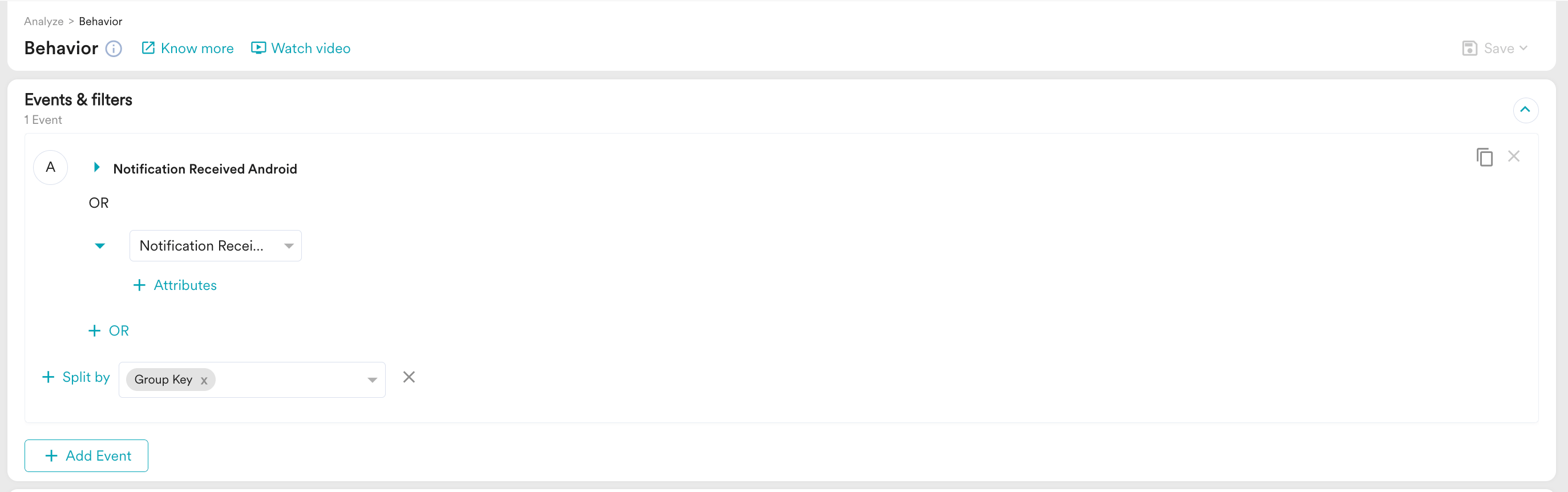
1. On the left navigation menu in the MoEngage dashboard, click **Analyze**, and then click **Behavior**.
2. In the **Events and filters** section, select the *Notification Received Android*OR *Notification Received iOS* attributes and Split by *Group Key*as shown in the image below.
 3. Save the output as a table for future reference.
# Best Practices
* Use clear group key definitions. Ensure that notifications in the same campaign share a logical grouping.
* Test grouping behavior on multiple devices. Verify that notifications stack correctly on Android and iOS.
* Create a custom dashboard to identify the common groups used in Android and iOS.
3. Save the output as a table for future reference.
# Best Practices
* Use clear group key definitions. Ensure that notifications in the same campaign share a logical grouping.
* Test grouping behavior on multiple devices. Verify that notifications stack correctly on Android and iOS.
* Create a custom dashboard to identify the common groups used in Android and iOS.